






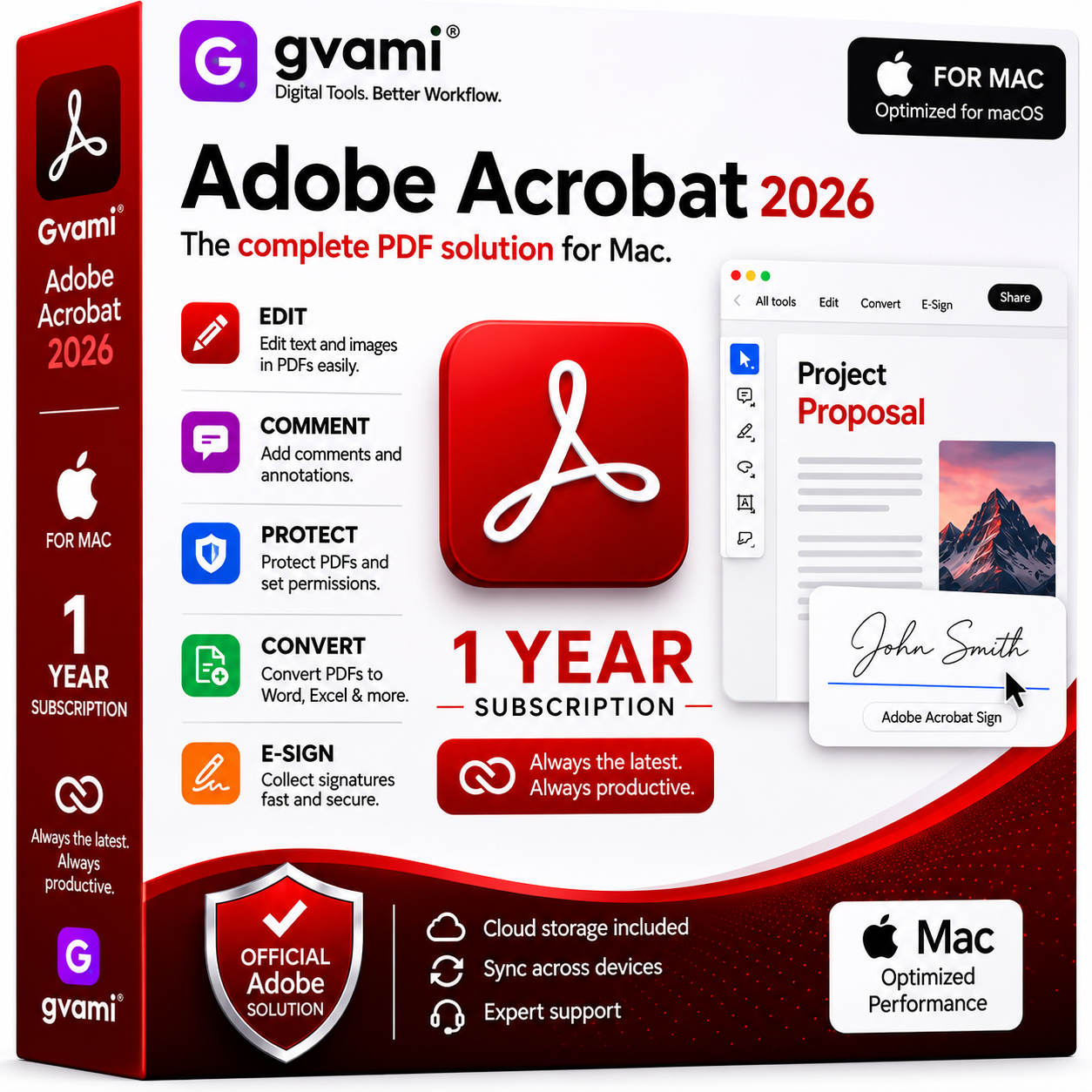
Adobe Acrobat 2026 for Mac – 1 Year Subscription
$149.99
- Secure, encrypted checkout
- Key and download link sent by email
- Read our refund policy

From checkout to activated in three steps
Place your order
Pick the edition that fits your device and pay through our secure checkout.
Check your inbox
Your licence key, download link and setup guide arrive by email.
Install and activate
Follow the guide step by step, and write to us if anything gets stuck.
Adobe Acrobat 2026 for Mac – 1 Year Subscription
Adobe Acrobat 2026 for Mac is a professional PDF editing and document management solution designed for individuals, businesses, students, and professionals who regularly work with digital documents.
From editing PDF files and converting documents to organizing pages, preparing business reports, and managing electronic signatures, Adobe Acrobat brings essential PDF tools together in one convenient workspace.
Designed for compatible Apple Mac computers, this product offers 1 year of subscription access through a supplied account, together with login instructions and a seller-provided warranty for qualifying account-access issues.
Whether you’re managing contracts, invoices, presentations, forms, academic documents, or everyday PDF files, Adobe Acrobat helps simplify document workflows and improve productivity.
Key Features of Adobe Acrobat 2026 for Mac
- Professional PDF Editing: Modify supported text, images, and document elements directly within PDF files.
- PDF Creation: Generate PDF documents from compatible source files.
- Document Conversion: Convert supported PDF documents into other compatible formats.
- Page Organization: Rearrange, rotate, remove, and organize PDF pages.
- Combine PDF Files: Merge multiple supported documents into a single PDF.
- Electronic Signatures: Access supported signing and document approval features.
- Document Management: Prepare, organize, and maintain professional PDF files.
- Mac Compatibility: Designed for supported Apple Mac computers.
- 1-Year Subscription: Access to the advertised subscription for 12 months.
- Digital Account Delivery: Receive login credentials and usage instructions.
- 1-Year Seller Warranty: Coverage for qualifying account-access issues under the stated conditions.
Professional PDF Editing on Mac
Adobe Acrobat provides a comprehensive collection of tools for editing and managing PDF documents directly from your Mac.
Instead of recreating an entire document when only a few changes are needed, you can modify supported content within existing PDF files.
This functionality is particularly useful for professionals who frequently work with business contracts, financial reports, invoices, presentations, proposals, and administrative documents.
Edit Existing PDF Documents
Make changes to supported text, images, and document elements while maintaining the overall structure of your PDF.
Common editing tasks include:
- Correcting text and updating information
- Modifying supported images
- Adjusting document content
- Preparing revised PDF files
- Organizing document pages
- Reviewing professional documents
These tools help reduce repetitive work and make document updates more convenient.
Create and Convert PDF Documents
Adobe Acrobat provides tools for creating PDF documents from supported source files and converting compatible PDF content into other document formats.
PDF Creation
Create professional PDF documents for sharing, printing, archiving, and business communication.
PDF files are widely used because they help preserve document structure and provide consistent viewing across different devices.
PDF Conversion
Convert supported PDF documents into compatible editable formats when additional modifications are required.
Conversion features can help users work with information originally stored in PDF files without manually recreating entire documents.
Available conversion formats depend on the specific Acrobat edition and subscription features.
Organize and Combine PDF Files
Managing large documents becomes easier with Adobe Acrobat’s page organization tools.
Users can rearrange document pages, rotate incorrectly oriented pages, remove unnecessary sections, and combine supported files into a single organized PDF.
Document Organization Features
- Merge multiple PDF documents
- Rearrange page order
- Rotate individual pages
- Remove unnecessary pages
- Prepare structured reports
- Combine related documents
- Organize business records
- Create consolidated PDF files
These capabilities are useful for businesses, students, administrative professionals, and anyone working with multiple documents.
Electronic Signatures and Document Workflows
Adobe Acrobat includes tools for supported electronic signature and document approval workflows.
Users can work with digital documents that require signatures, review, or approval without relying entirely on printed paperwork.
Electronic signing capabilities can help streamline document-related tasks for freelancers, businesses, consultants, and remote professionals.
Certain online signing services may require additional account permissions or an eligible Adobe subscription.
Professional Document Management for Businesses
Adobe Acrobat is widely used in business environments where PDF documents are part of everyday operations.
Companies regularly work with contracts, purchase orders, invoices, financial statements, proposals, reports, and internal documentation.
Having professional PDF editing and organization tools available in one application can simplify these workflows.
Common Business Uses
Contracts and Agreements
Prepare, review, and organize business documents.
Invoices and Financial Documents
Manage PDF invoices, reports, and financial paperwork.
Business Proposals
Create and organize professional proposals and presentations.
Administrative Documents
Maintain structured records, forms, and internal documentation.
Remote Work
Prepare and share digital documents with colleagues, clients, and business partners.
Educational Documents
Organize study materials, academic reports, and PDF-based learning resources.
Who Is Adobe Acrobat 2026 for Mac For?
Adobe Acrobat is suitable for a wide range of users, including:
- Business professionals
- Small and medium-sized businesses
- Freelancers and consultants
- Students and educators
- Administrative teams
- Remote workers
- Accountants and financial professionals
- Marketing professionals
- Content creators
- Legal and documentation teams
- Professionals working with reports and contracts
- Everyday Mac users managing PDF documents
Whether you’re handling occasional PDF files or managing documents regularly, Adobe Acrobat provides tools for a more organized workflow.
Product and Subscription Information
| Specification | Details |
|---|---|
| Product | Adobe Acrobat |
| Advertised Version | 2026 |
| Platform | Apple Mac |
| Subscription Duration | 1 Year |
| Product Type | Digital Software Subscription |
| Delivery Method | Supplied Account Credentials |
| Account Access | Included in the seller’s offer |
| Warranty | 1 Year for qualifying account-access issues |
| Primary Use | PDF Editing and Document Management |
The exact Acrobat edition and available features should be confirmed before purchasing.
What Will You Receive After Purchase?
According to the supplied product offer, your purchase includes:
- Access to the advertised Adobe Acrobat subscription.
- One year of subscription access.
- Login credentials for the supplied account.
- Important account and usage instructions.
- Access to supported PDF editing and management features.
- Installation and access guidance where required.
- A one-year seller warranty for qualifying account-access issues.
- Assistance with covered access problems during the warranty period.
Customers should review the account conditions and subscription details before completing their purchase.
Important Account Usage Instructions
This product is supplied through account access. The seller’s offer specifies certain restrictions intended to maintain access throughout the subscription period.
Account Rules
1. Keep the Primary Email Address Unchanged
The primary email associated with the supplied account must not be changed.
2. Do Not Modify Billing or Profile Settings
Customers are instructed to keep the existing billing and profile configuration unchanged.
3. Secondary Email Address
A secondary email may be added where supported, provided it does not replace or modify the primary email.
4. Password Changes
The account password may be changed if necessary. Customers should securely store any updated password.
5. Follow the Supplied Instructions
Review the account instructions before making changes to account information.
Important: These are conditions of the seller’s advertised offer. They do not independently establish that the account arrangement is authorized by Adobe or that the subscription can legally be transferred to another user.
1-Year Seller Warranty
The advertised product includes a one-year seller warranty for qualifying account-access issues.
If a covered access problem occurs during the subscription period, customers may contact the seller’s support team for assistance.
Warranty coverage is subject to the stated account conditions and applicable warranty terms.
Customers should confirm the available remedies, support process, and exclusions before purchase.
This seller-provided warranty should not be represented as an official Adobe warranty unless separately verified.
Mac Compatibility and System Requirements
Adobe Acrobat is designed for compatible Apple Mac computers.
Operating System: Supported version of macOS
Processor: Compatible Intel or Apple silicon processor
Memory: Sufficient RAM for the installed Acrobat version
Storage: Available disk space for software installation and PDF files
Internet Connection: May be required for downloading, account authentication, activation, and online services
Additional Requirements: Certain cloud-based and electronic signature features may require an eligible Adobe account or subscription.
System requirements and feature availability may change with software updates.
Customers should confirm compatibility with their Mac before purchasing.
Frequently Asked Questions
What is Adobe Acrobat 2026 for Mac?
Adobe Acrobat is a professional PDF application designed for creating, editing, converting, organizing, and managing digital documents.
How long does the subscription last?
This product is advertised as providing one year of subscription access.
What will I receive after purchasing?
According to the seller’s offer, customers receive account credentials, access instructions, and the subscription benefits described in the listing.
Is a warranty included?
Yes. The seller advertises a one-year warranty for qualifying account-access issues, subject to the stated warranty conditions.
Can I edit existing PDF files?
Yes. Acrobat provides professional tools for editing supported PDF content, including text, images, and document pages.
Can I combine multiple PDF documents?
Yes. Supported document management tools allow users to combine and organize PDF files.
Does Acrobat support electronic signatures?
Adobe Acrobat offers electronic signing features. The exact capabilities available depend on the Acrobat edition and subscription eligibility.
Can I change the primary email address?
No. The supplied account instructions require the primary email to remain unchanged.
Can I add a secondary email address?
Yes, where supported, provided the primary email remains unchanged.
Can I change the account password?
The seller’s instructions allow password changes when necessary.
Can I modify billing or profile information?
No. The supplied offer instructs customers not to change the account’s billing or profile settings.
Is this product compatible with Windows?
No. This specific listing is intended for compatible Apple Mac computers.
Does the subscription renew automatically?
Automatic renewal is not specified in the supplied offer. Customers should confirm renewal conditions before purchasing.
Simplify PDF Management with Adobe Acrobat for Mac
Adobe Acrobat 2026 for Mac – 1 Year Subscription provides a professional environment for editing, converting, organizing, and managing PDF documents.
With tools for document creation, page organization, supported electronic signatures, and everyday PDF workflows, Acrobat helps individuals and businesses manage their digital documents more efficiently.
The advertised offer includes one year of subscription access through a supplied account and a one-year seller warranty for qualifying account-access issues.
Explore Adobe Acrobat for Mac and discover a more efficient way to work with PDF documents.
Customer Reviews
- Delivered to your inbox
- Licence type on every page
- Windows · Office · Server
- Step-by-step setup guides
- Secure, encrypted checkout
- Real people on support
- Pay once, keep it
- Delivered to your inbox
- Licence type on every page
- Windows · Office · Server
- Step-by-step setup guides
- Secure, encrypted checkout
- Real people on support
- Pay once, keep it
Reviews
Clear filtersThere are no reviews yet.