






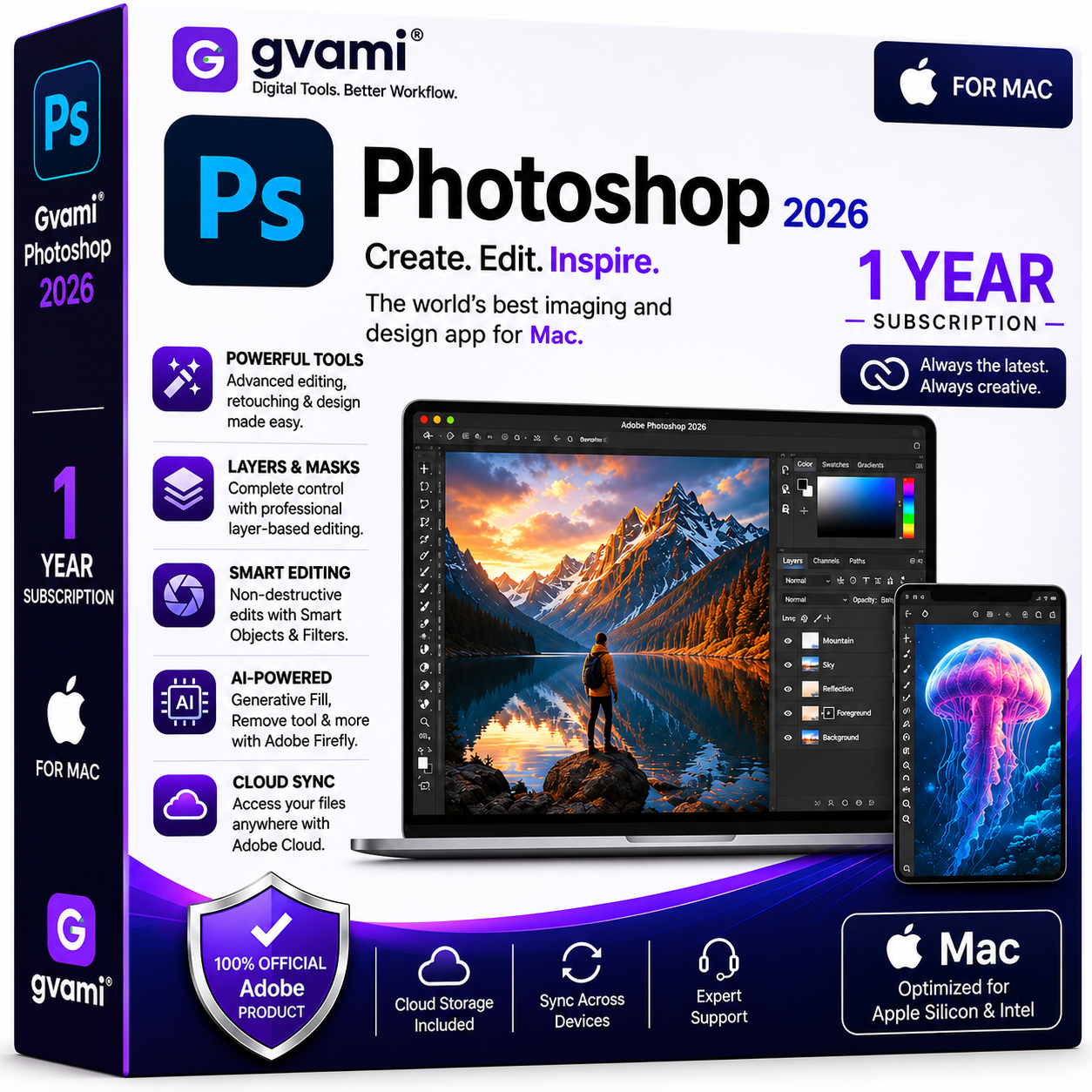
Adobe Photoshop 2026 for Mac – 1 Year Subscription
$149.99
- Secure, encrypted checkout
- Key and download link sent by email
- Read our refund policy

From checkout to activated in three steps
Place your order
Pick the edition that fits your device and pay through our secure checkout.
Check your inbox
Your licence key, download link and setup guide arrive by email.
Install and activate
Follow the guide step by step, and write to us if anything gets stuck.
Adobe Photoshop 2026 for Mac – 1 Year Subscription
Adobe Photoshop 2026 for Mac is a professional photo editing and graphic design application created for photographers, designers, digital artists, content creators, and businesses looking to produce high-quality visual content.
From enhancing photographs and retouching portraits to designing advertisements, social media graphics, and professional digital artwork, Photoshop provides a powerful creative environment with advanced editing capabilities.
Designed for compatible Apple Mac computers, this product offers 1 year of subscription access, supplied through an account with login credentials and usage instructions.
The advertised offer also includes a 1-year warranty for qualifying account-access issues, subject to the stated warranty conditions.
Key Features of Adobe Photoshop 2026 for Mac
- Professional Photo Editing: Enhance photographs with precise adjustments to lighting, exposure, colors, and image details.
- Advanced Retouching: Remove imperfections, refine portraits, and improve product photography.
- Layer-Based Editing: Organize and modify individual design elements while maintaining creative flexibility.
- Smart Selections and Masks: Isolate subjects, remove backgrounds, and create detailed image compositions.
- Graphic Design Tools: Create advertisements, banners, social media posts, and marketing graphics.
- Color Correction: Adjust contrast, brightness, saturation, shadows, and highlights.
- Creative Effects: Apply filters, blending modes, and adjustment layers to develop unique visual styles.
- High-Resolution Editing: Work with detailed photographs and professional design projects.
- Mac Compatibility: Designed for supported macOS computers.
- 1-Year Subscription: Access to the supplied Photoshop subscription for the advertised period.
- Digital Account Delivery: Receive login credentials and important usage instructions after purchase.
- 1-Year Warranty: Coverage for qualifying account-access issues under the seller’s stated conditions.
Professional Photo Editing on Mac
Adobe Photoshop provides a comprehensive environment for editing, enhancing, and transforming digital photographs.
Whether you’re working with portraits, landscapes, product photography, commercial images, or personal projects, Photoshop offers precise editing tools for improving image quality.
Advanced Photo Retouching
Refine photographs using professional retouching tools designed to correct imperfections and enhance visual details.
Photoshop supports a variety of editing workflows, including:
- Portrait and skin retouching
- Image restoration
- Product photo enhancement
- Background removal and replacement
- Color and exposure correction
- Lighting adjustments
- Creative image manipulation
- Detailed image compositing
These tools help photographers and designers prepare polished images for portfolios, websites, advertising campaigns, and commercial projects.
Layer-Based Editing and Professional Compositing
Photoshop’s layer-based editing system allows users to create complex compositions while maintaining control over individual design elements.
Combine photographs, typography, graphics, and effects without permanently modifying the original image.
Creative Editing Capabilities
Layers
Organize images, text, and graphic elements independently for greater flexibility.
Layer Masks
Reveal or hide specific areas of a composition without permanently deleting image content.
Adjustment Layers
Modify colors, exposure, contrast, and other image properties using non-destructive editing techniques.
Blending Modes
Combine layers creatively to produce unique lighting effects, textures, and visual compositions.
Selection Tools
Isolate objects, people, and backgrounds for targeted editing and professional image manipulation.
These features make Photoshop suitable for both simple image adjustments and advanced creative projects.
Graphic Design and Digital Content Creation
Adobe Photoshop is more than a photo editing application. It also provides a flexible environment for creating digital graphics, marketing materials, and branded visual content.
Designers can combine images, typography, shapes, and creative effects to develop professional graphics for different platforms.
Popular Creative Projects
- Social media graphics
- Website banners
- Advertising campaigns
- Product images
- Promotional materials
- YouTube thumbnails
- Presentation graphics
- Digital illustrations
- Photo compositions
- Marketing content
- E-commerce product imagery
- Creative visual projects
Whether you’re preparing content for an online store or designing graphics for a marketing campaign, Photoshop provides the flexibility needed to develop professional visual assets.
Advanced Selection and Background Editing
Photoshop includes powerful selection and masking tools that help users isolate specific elements within an image.
These capabilities are particularly useful when removing backgrounds, replacing objects, adjusting selected areas, or combining multiple photographs.
Background Editing Capabilities
- Select and isolate subjects
- Remove unwanted backgrounds
- Replace image backgrounds
- Refine complex selections
- Adjust specific image areas
- Combine multiple visual elements
- Create professional product compositions
For e-commerce businesses, these tools are especially valuable when preparing consistent product photography and promotional images.
Professional Color Correction and Image Enhancement
Color accuracy and image quality are essential for professional photography and design.
Photoshop provides detailed controls for adjusting brightness, contrast, exposure, saturation, shadows, highlights, and overall color balance.
These tools help users improve photographs while maintaining creative control over the final result.
Image Enhancement Features
- Exposure and brightness adjustments
- Color balance correction
- Contrast optimization
- Highlight and shadow recovery
- Saturation and vibrance adjustments
- Sharpness improvements
- Creative color grading
- Non-destructive adjustment workflows
Designed for Creative Professionals and Businesses
Adobe Photoshop 2026 for Mac supports creative workflows across a wide range of industries.
Who Is Photoshop For?
Photographers
Edit portraits, landscapes, commercial photographs, and professional photography projects.
Graphic Designers
Create digital layouts, advertising graphics, banners, and promotional designs.
Digital Artists
Develop illustrations, creative compositions, and original digital artwork.
Marketing Professionals
Prepare campaign graphics, promotional materials, and branded content.
E-commerce Sellers
Enhance product photographs, remove backgrounds, and create online store visuals.
Content Creators
Design social media posts, thumbnails, website graphics, and digital content.
Students and Educators
Learn professional image editing, graphic design, and creative production techniques.
Freelancers and Small Businesses
Produce professional visual content for clients, websites, and marketing campaigns.
Product and Subscription Information
| Specification | Details |
|---|---|
| Product | Adobe Photoshop |
| Advertised Version | 2026 |
| Platform | Apple Mac |
| Subscription Duration | 1 Year |
| Product Type | Digital Software Subscription |
| Delivery Method | Account Credentials |
| Account Included | Yes, under the seller’s offer |
| Warranty | 1 Year for qualifying account-access issues |
| Primary Use | Photo Editing and Graphic Design |
What Will You Receive After Purchase?
According to the supplied product offer, your purchase includes:
- Account access for the advertised Adobe Photoshop subscription.
- One year of subscription access.
- Login credentials for the supplied account.
- Important account and usage instructions.
- Access to supported Photoshop features.
- Installation and access guidance where required.
- A one-year seller warranty for qualifying account-access issues.
- Support for covered access problems during the warranty period.
The supplied account and subscription conditions should be reviewed carefully before purchase.
Important Account Usage Instructions
This product is supplied through account access. The seller’s offer specifies certain account restrictions intended to maintain access during the subscription period.
Account Rules
1. Do Not Change the Primary Email Address
The primary email address associated with the supplied account must remain unchanged.
2. Do Not Modify Billing or Profile Settings
The supplied offer requires customers to keep the existing billing and profile configuration unchanged.
3. Secondary Email Address
A secondary email address may be added where supported, provided it does not replace or modify the primary email.
4. Password Changes
The account password may be changed if required. Customers should store any updated password securely.
5. Follow the Supplied Instructions
Customers should review and follow the provided account-access instructions.
Important: These are conditions stated by the seller, not confirmation that the account arrangement is authorized or supported by Adobe. Account ownership, transferability, and subscription eligibility should be verified before purchasing.
1-Year Warranty Information
The advertised product includes a 1-year seller warranty covering qualifying account-access issues during the stated subscription period.
If a covered access issue occurs, customers may contact the seller’s support team for assistance under the applicable warranty conditions.
Warranty eligibility is subject to the stated account rules and coverage terms.
The seller’s warranty should not be confused with an official Adobe warranty.
Mac Compatibility and System Requirements
Adobe Photoshop is designed for compatible Apple Mac computers.
Operating System: A supported version of macOS
Processor: Compatible Intel or Apple silicon processor
Memory: Sufficient RAM for the installed Photoshop release; additional memory recommended for complex projects
Storage: Available disk space for installation, temporary files, and creative projects
Display: Compatible display suitable for image editing and graphic design
Internet Connection: Required for downloading, account access, activation, and certain online features
System requirements and feature availability may change with software updates.
Customers should confirm their Mac’s compatibility with the relevant Photoshop version before purchasing.
Frequently Asked Questions
What is Adobe Photoshop 2026 for Mac?
Adobe Photoshop is professional image editing and graphic design software for photography, retouching, digital artwork, and visual content creation.
How long does the subscription last?
This product is advertised as providing one year of Photoshop subscription access.
What will I receive after purchasing?
According to the seller’s offer, you will receive account credentials, access instructions, and the subscription benefits included in the listing.
Is a warranty included?
Yes. The seller advertises a one-year warranty for qualifying account-access issues, subject to the warranty conditions.
Can I change the primary email address?
No. The supplied account rules state that the primary email address must remain unchanged.
Can I add a secondary email address?
Yes, where supported, provided the original primary email is not modified or replaced.
Can I change the account password?
The seller’s instructions allow password changes when necessary.
Can I modify billing or profile information?
No. The supplied offer instructs customers not to change billing or profile settings.
Can I use Photoshop for professional photography?
Yes. Photoshop includes advanced tools for photo editing, retouching, image manipulation, and color correction.
Can I create social media and marketing graphics?
Yes. Photoshop can be used to design advertisements, banners, thumbnails, promotional graphics, and other digital content.
Is this product compatible with Windows?
No. This specific listing is intended for compatible Apple Mac computers.
Does the subscription automatically renew?
Automatic renewal is not specified in the supplied offer. Customers should confirm renewal conditions with the seller before purchase.
Create Professional Visual Content with Adobe Photoshop for Mac
Adobe Photoshop 2026 for Mac – 1 Year Subscription provides access to a versatile creative application for photography, image editing, graphic design, and digital content creation.
With professional retouching tools, flexible layer-based editing, advanced selections, and comprehensive graphic design capabilities, Photoshop supports a wide range of personal and commercial creative projects.
The advertised offer includes one year of subscription access through a supplied account and a one-year seller warranty for qualifying account-access issues.
Explore Adobe Photoshop for Mac and develop your creative projects with professional editing and design tools.
Customer Reviews
- Delivered to your inbox
- Licence type on every page
- Windows · Office · Server
- Step-by-step setup guides
- Secure, encrypted checkout
- Real people on support
- Pay once, keep it
- Delivered to your inbox
- Licence type on every page
- Windows · Office · Server
- Step-by-step setup guides
- Secure, encrypted checkout
- Real people on support
- Pay once, keep it







Reviews
Clear filtersThere are no reviews yet.